Can Picsart restore old photos? Yes — with an enhancer's limit
Picsart ships an actual restoration tool rather than a chatbot: upload a scan, tap once, and a cleaner, sharper photograph comes back. The question is not whether it works — plainly it does — but what it has put into the picture.
No credit card required. Your photo is deleted from storage within 30 days.
What Picsart actually offers here is worth separating from the assistant tools, because it is a genuinely different thing. There is a dedicated photo restoration page: upload a scan, press Restore, and a model cleans up damage, sharpens faces and improves clarity, with batch processing for a whole album. Beside it sit AI Enhance, an upscaler and a colouriser. This is a restoration model, trained on pairs of damaged and clean photographs, and on a mildly damaged print the one-tap result is often better than what most people achieve retouching by hand. Saying otherwise would be dishonest.
The limit is in the mechanism, and Picsart's own help is unusually clear about it: AI Enhance works best on slightly blurry photos, older low-resolution photos and pixelated images. That is a sharpening and reconstruction model, not a repair engine. Asked to sharpen a face that has eighty pixels of information across it, it produces a face — skin smoothed, features restyled into the shape the model prefers. That is the same pass that makes the before-and-after examples so impressive, which is exactly why it deserves a closer look: a pleasing face and a faithful face are not the same output, and only one of them belongs in a family record.
Then the practical frame. Picsart is a creator app first, built for phones and social posts, and its frames are app sizes rather than print sizes. Some AI Enhance options are free and others need a subscription or credits, which the app flags before you apply one, so the strongest model tends to sit behind the paywall. All of that is fine for the photograph that is going into a family group chat this evening. None of it is aimed at the print you intend to frame or the album you intend to hand down.
Cleaner and sharper, or actually rebuilt
Two soft prints, two different operations. Enhancement turns a small scan into something that looks sharp on a screen. Repair keeps the texture the print still has and rebuilds the structure it has lost.
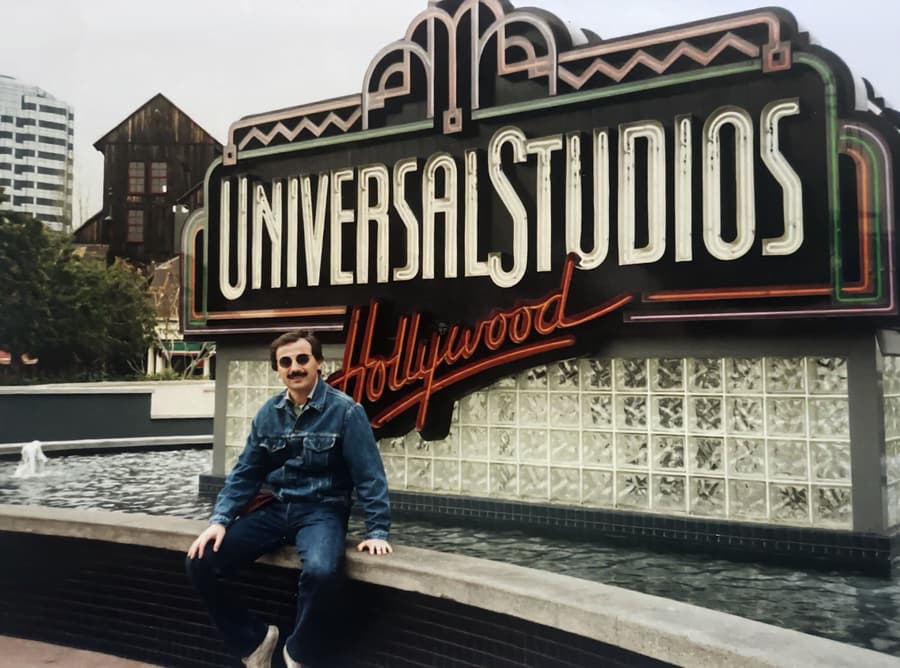
A small scan, enlarged and clarified
Softness reduced, detail rebuilt from the grain the print still holds, and the sign lettering readable again. This is the case where enhancement is the right tool: the information was there, compressed by the scan.
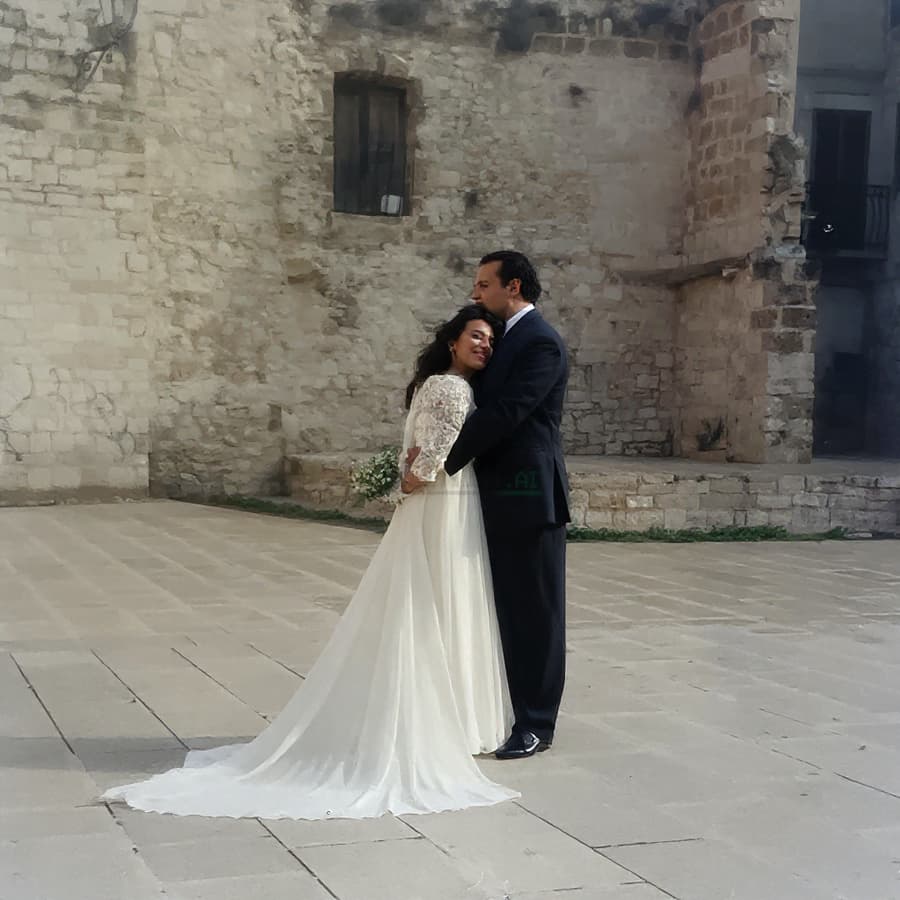
A washed-out print, repaired in place
A wedding print blurred and bleached by a small scan, brought back with the stonework and the fabric visible again and both faces untouched. No smoothing, no restyled features: the couple is the couple in the print.
What a one-tap enhancer cannot know
At heart it is an enhancer: sharpening, denoising, colour balance and face reconstruction in a single pass. Enhancement cannot recover information the file does not contain, and the tool is pointed at slightly blurry, low-resolution and pixelated images rather than at tears, mould and missing corners.
Face reconstruction is where the invention concentrates. The model has a preferred idea of how a face should look at high resolution and moves what it can see toward that idea, so the result is sharper, smoother and subtly someone else.
Damage that needs structure rebuilt — a tear through a sleeve, a stain across a dress, a corner eaten by damp — is not what a denoise-and-sharpen model does. Applied anyway, it flattens the damage into the surrounding texture and calls it clean.
One tap means no control. There is no setting for sharpening the hair and leaving the eyes alone, so the strength that delights on a snapshot is the same strength that over-processes a portrait.
Some AI Enhance options are free and others require a subscription or credits, which the app indicates before you apply them. The paywall therefore lands hardest on the most degraded photographs, which are the ones that need the heaviest model.
It is a creator app in the same panel as filters, stickers, text and effects, and the sizes it exports to are social and screen sizes rather than print sizes. A restoration that ends at 1,080 pixels is not a restoration for a frame.
Everything returns as a picture rather than a specification. There is no way to ask for 2,400 pixels of this exact face for an 8×10 print: the canvas belongs to the app, not to your printer.
Getting the most out of Picsart, and knowing when not to
Use the free pass as a diagnosis
Run one photo through it and read the before-and-after slider as evidence rather than as a result: what has been cleaned, where the damage was, and whether the face changed shape. That takes a couple of minutes and tells you what the print actually needs before you spend an evening on it.
Judge the face at 100%, never at phone size
A phone screen is the wrong instrument for this judgement — at that size every enhancement looks like an improvement. Open both files on a desktop, zoom to 100%, and compare the eyes, the ears and the hairline. If the eyes have changed shape, the model has drawn a face rather than recovered one.
Repair the structure first and enhance afterwards
Order matters more than settings: damage removed in place, tone and colour recovered from the file, and only then resolution built up to the size you intend to print. Enhancing a torn, spotted scan teaches the model to treat damage as texture, and the original file should stay untouched the whole way through.
Private by design
Auto-deleted in 30 days
50 MB and 8,192 px
The largest photo the uploader accepts
First one is free
No credit card required
Picsart and old photos — the honest FAQ
Can Picsart restore old photos?
Yes, and it is one of the few tools here that is honestly built for it: a dedicated restoration tool plus AI Enhance, one tap, a few seconds, batch processing for whole albums. The limit is that it is an enhancement model. It recovers what the scan holds and reconstructs the rest, and on a badly degraded face the reconstructed part is the part you would most want to be real.
Is Picsart's photo restoration free?
There is a free tier, and some AI Enhance options run on it while others need a subscription or credits — the app tells you which before you apply one. Since the heaviest models sit behind the paywall and the worst photographs need the heaviest models, testing the tool on your hardest photo usually means paying for it.
Does Picsart change faces in old photos?
It reconstructs them, which on a legible face looks like flattering sharpening and on a degraded one looks like a different person. The model is trained on faces and fills in what the source cannot support, so the output drifts toward what a face should look like. Compare the eyes at 100% and the difference is plain to see.
Can Picsart repair a torn or water-damaged photo?
It will smooth the damage rather than rebuild it. A tear or a water stain needs the missing structure reconstructed from the print around the damage — the fabric weave, the line of a shoulder, the grain of the paper. A denoise-and-sharpen pass cannot do that; it blends the damage into its surroundings.
Can Picsart make an old photo printable?
It can enlarge a photo, though the app is built around screen and social sizes. A 300 dpi 8×10 inch print needs roughly 2,400 by 3,000 pixels of the real subject, and enlarging a soft scan supplies much of that from the model rather than from the photograph. Fine for a small print, thin for a frame.
What is the best alternative to Picsart for old photos?
A pipeline where the repair happens in place: damage rebuilt from the print's own structure, tone recovered from the scan, faces constrained to the original, and output built to the print size you choose. Pinin does that pass, the first restoration is free, and the 100% eye test is worth running on anyone's result, ours included.
Sharper is not the same as faithful
One tap tells you what is wrong with a print; it does not put the print back. Pinin repairs the file itself — damage rebuilt from the print's own pixels, faces left as they were, output sized for print. First restoration free, no card required.
Restore your first photo for freeWhere this page sends you next
- Can Remini restore old photos? — the other one-tap enhancer, with the same face problem
- Can Canva restore old photos? — the other creator app, one step later
- Can Copilot restore old photos? — what an assistant does instead: talk about the photo
- Can Grok restore old photos? — a faster, prettier re-draw of the whole scene
- Can Midjourney restore old photos? — generation with no repair claim at all
- Can Lightroom restore old photos? — the tone half, and the album-scale answer
- Free photo restoration — run the same file through a repair pass, free