Can Grok restore old photos? It returns a new photograph
Grok is what people reach for when they want an old photo to look better now, and it will deliver — impressively, in seconds, with the styling of a current image. The result is a generated picture in which your print is the reference rather than the source of truth.
No credit card required. Your photo is deleted from storage within 30 days.
Grok's image path takes a source image and a written instruction and returns a new image. That is the whole contract, and it is worth reading literally: xAI's documentation describes image editing as supplying an image and describing the change you want applied, with multi-image editing accepting up to five references to combine subjects, transfer styles and compose scenes. Nothing in that arrangement promises the pixels of your photograph survive. The old print is a reference the model composes from.
So the honest answer to “can Grok restore old photos” is that it will give you a better-looking picture of the same scene, rebuilt from the model's own idea of how that scene should look. When the model's idea is close to reality — a face still legible, a setting it recognises, light it has seen a thousand times — the result is arresting. That is why the tool is so popular for exactly this, and why the demonstration posts are so persuasive. Look closely at what changed: skin smoothed, colour rebuilt with modern saturation, hair and clothing quietly updated, the background occasionally improved beyond anything the print contains. That is a re-draw, and a re-draw is the opposite of a repair.
There is a second side to it that the same documentation makes plain. xAI bills an edit for both the input image and the generated output, and multi-image editing is a compositing tool: five references, blended. Compositing is a genuinely useful operation — put the grandmother from one print into the setting of another — and it produces a beautiful new photograph that is no longer evidence of anything. If what you want is a family archive rather than a striking picture, that distinction is the whole decision.
Repainted, or repaired
Two problems an old print presents, and the two different answers. The first pair is a repair: the file was fixed, the faces left alone. The second shows what happens to a soft face when a model is asked to make it sharp.
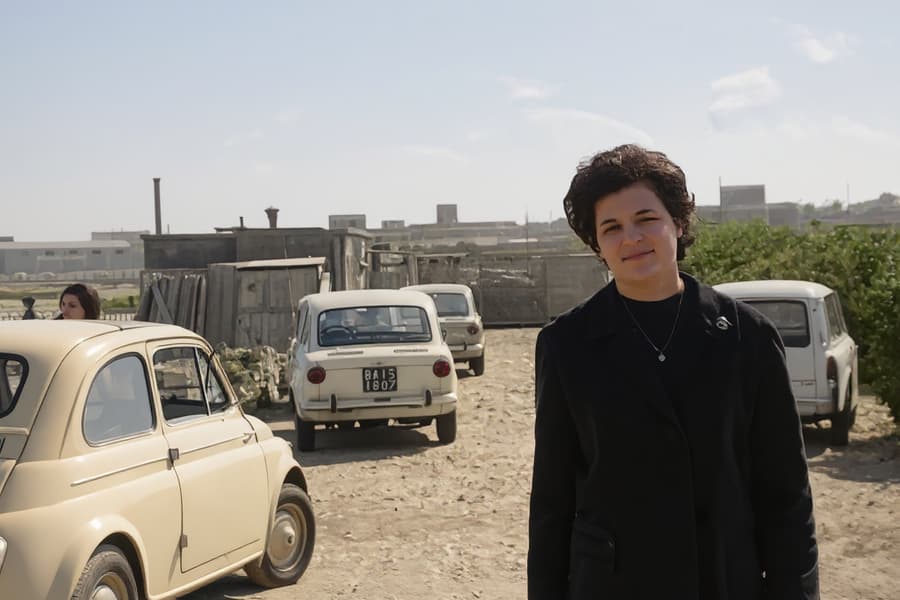
The scene kept, the colour recovered
Contrast pulled back, colour balanced from the print's own information, the magenta drift gone. The woman is the woman: no features have been redrawn, which is exactly what you want from a photograph you intend to keep.
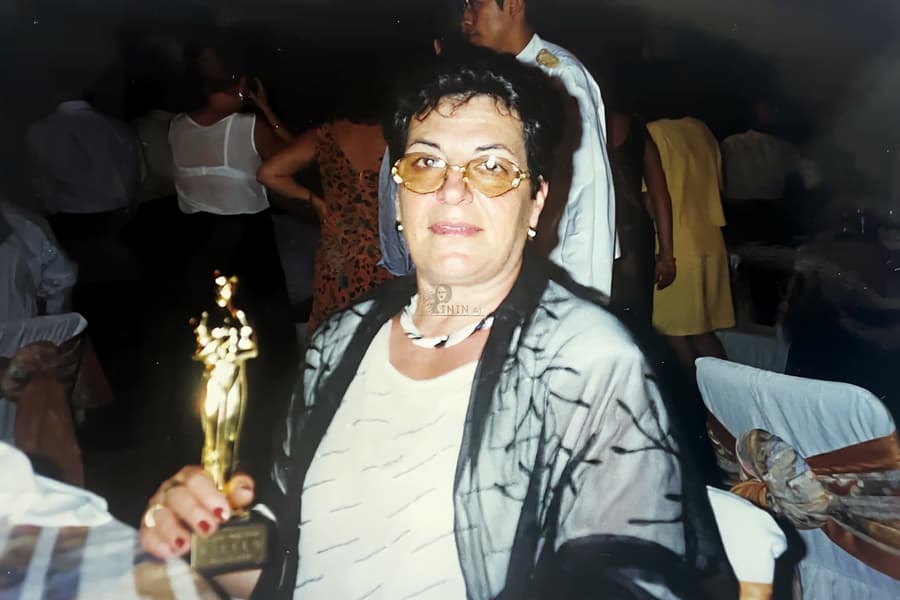
Sharpened, and where the sharpening comes from
A soft portrait, cleaned and enlarged. The detail in the face comes from the pixels the print still holds, not from a model's idea of a generic face — which is the difference between sharpening this photograph and repainting it.
Why the pretty result is the wrong evidence
A photograph sent to Grok is a reference. The output is composed from the model's training rather than repaired from your file, so nothing in the process pins the original pixels in place.
The “revive” look is a re-draw: skin smoothed, colour rebuilt at modern saturation, hair and clothing brought up to date. Note how the popular examples change what people are wearing — that is generation, not restoration.
Multi-image editing takes up to five references and blends them for compositing subjects and styles. Superb for building a scene that never existed, and a poor fit for a document you want to keep.
Fine detail is explicitly variable. Freckles, jewellery, a name on a sign, a number plate: the model renders what a plausible photograph of that scene would contain, not what your print contains.
Output resolution is the generator's canvas, not your print's requirement. A 300 dpi 8×10 needs about 2,400 by 3,000 pixels of the real subject, and a generated image is not built to that specification.
It will happily animate the still into video, which is a lovely thing to do with a family photo and one more step away from the photograph itself. Keep the original as the original.
Edits are billed for the input image and the generated output, and your scan is uploaded to a third-party service. For a shoebox of family photographs, that is a decision worth making deliberately rather than by default.
The right use, the wrong use, and the test that separates them
Use it for the photograph that no longer exists
There is one case where a generative model is the right tool and nothing else comes close: the original is gone — burnt, lost, the negative destroyed — and all that survives is a description, a memory and one poor copy. Ask Grok for a likeness from that, keep it, and label it as a re-creation, because that is what it is.
Run the 100% eye test before you show anyone
Open the original and the result side by side at 100% and compare the eyes, the ears, the hairline and the jewellery. That comparison takes thirty seconds and settles the question the demonstrations never address: is this the person, or a convincing portrait of someone like them?
Repair the print in place, and keep the original untouched
For a photograph that still exists, the order matters: damage removed first, tone and colour recovered from the file, resolution built afterwards to the size you intend to print. A generated copy should never replace the scan — it belongs beside it, with the original still on the shelf.
Private by design
Auto-deleted in 30 days
50 MB and 8,192 px
The largest photo the uploader accepts
First one is free
No credit card required
Grok and old photos — the honest FAQ
Can Grok restore old photos?
It will take your photograph and return a better-looking one, but by generating it. xAI's own documentation describes image editing as supplying a source image plus an instruction, with up to five references for multi-image editing — a compositing and generation path with no pixel-preservation promise. For a striking picture, that works. For a repaired archive, it is the wrong operation.
Does Grok change the faces in an old photo?
The face in the result is produced by the model rather than derived from your print, so it is constrained by training data and by the shape that survived, not by the person. On a clear face, the change reads as a pleasant modernisation. On a degraded one, the model is doing most of the work, and what you are looking at is a new portrait. Compare the eyes at 100% and decide consciously.
Can Grok repair a torn or water-damaged photo?
It will fill the area with plausible content, which is the opposite of repairing it. A tear through a sleeve or a corner eaten by damp needs the structure rebuilt from the print around the damage — the fabric weave, the line of the shoulder, the grain of the paper. A generative fill supplies what a model thinks belongs there.
Is Grok free for photo editing?
There is a free tier with limits and paid tiers with higher ones, and xAI bills image edits for the input image as well as the generated output. None of that changes what the operation is: paying more buys more generation, not more repair.
Can Grok make an old photo printable?
Not to a print specification. The image arrives at the generator's own size, and the model is not built to deliver an exact pixel count of the exact original subject. Screen-sized results look superb; a framed 8×10 at 300 dpi needs roughly 2,400 by 3,000 pixels of the real photograph.
What is the best alternative to Grok for old photos?
Something that repairs the file instead of composing a new one: damage rebuilt from the print's own pixels, tone recovered from the scan, faces left alone, output sized for the print. That is what Pinin does, the first photo is free to try, and the 100% eye test works just as well on our result as on Grok's.
Repainted, or actually repaired
Grok will compose you a beautiful new picture of the scene. Pinin repairs the print you already have, so the face in the frame is still your grandmother. First restoration free, no card required.
Restore your first photo for freeWhere this page sends you next
- Can Copilot restore old photos? — the assistant that reads brilliantly and repaints anyway
- Can ChatGPT restore old photos? — the same two-tool problem, one platform over
- Can Midjourney restore old photos? — generation as the product, honestly labelled
- Can Gemini restore old photos? — the assistant re-draw with a different aesthetic
- Can Remini restore old photos? — a dedicated enhancer and its face problem
- Can Meta AI restore old photos? — the same idea, sized for a feed
- Free photo restoration — test the difference on your own hardest photo