Can Midjourney restore old photos? No — it paints a new one
Midjourney is the best in the world at producing a photograph that does not exist yet. That is a different job from repairing one that does, and its documentation is unusually honest about the difference.
No credit card required. Your photo is deleted from storage within 30 days.
Start with the sentence from Midjourney's own documentation, because it answers the question better than any review could: image prompts and references are used as inspiration to guide new creations, not to copy them exactly. Feeding your scan into Midjourney tells the model what the picture should feel like — the subject, the composition, the palette. It does not file those pixels away as something to preserve, because preserving them was never the instruction it was given.
The editing path follows the same logic. Midjourney's Edit model makes changes to an existing image using written instructions, and the Editor inpaints selected areas and outpaints beyond the frame. Inpainting is the operation that makes a blemish disappear by drawing a new one: on an old photograph the tear, the foxing and the missing corner come back as whatever the model considers plausible for that area, not as the structure the print still suggests. Parameters exist that increase how strongly a reference influences the result, and it is worth being precise about what that buys you — influence is not fidelity. A more obedient re-draw is still a re-draw.
Which leaves the one job where Midjourney is not merely acceptable but the best answer available, and it deserves to be said clearly because it is a real need. Sometimes the photograph is gone: lost in a fire, destroyed by damp, the negative thrown out decades ago, and all that survives is a single blurred copy in which the person's features have dissolved. There is no repair possible, because there is nothing to repair. Midjourney will compose a likeness from what you can describe — and if you label it as a re-creation, keep it out of the archive, and never let anyone believe it is the photograph, you have used it exactly right.
The photograph, and a picture of it
The first pair is a damaged print repaired in place: everything in the frame was already in the frame. The second is the other half of the job — a soft, worn print brought back to something you can print and keep, with the faces that were on the paper.
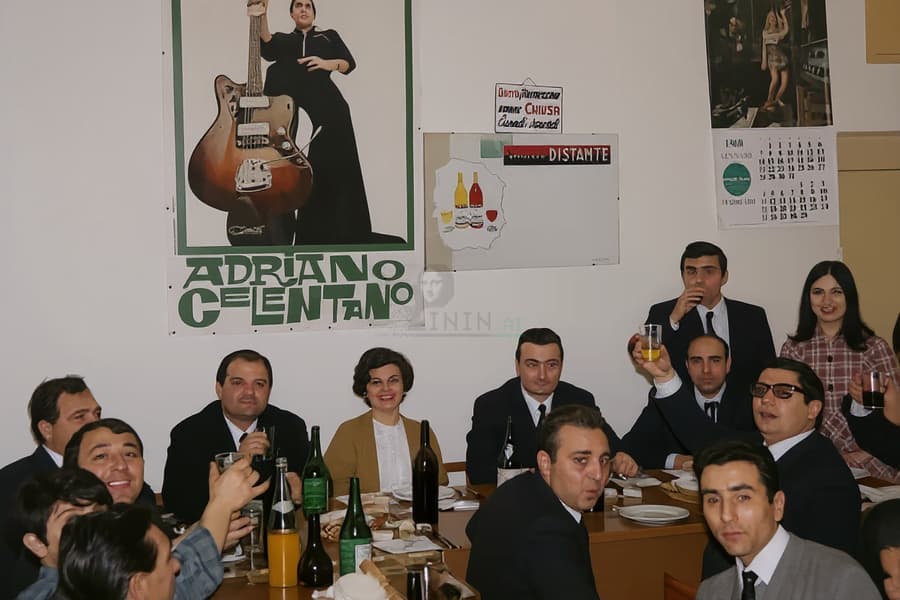
A worn banquet print, repaired
Yellowing corrected, the mottling across the print removed, the crease and the worn edges repaired from the surrounding structure. The faces and the room are exactly the ones in the original photograph.
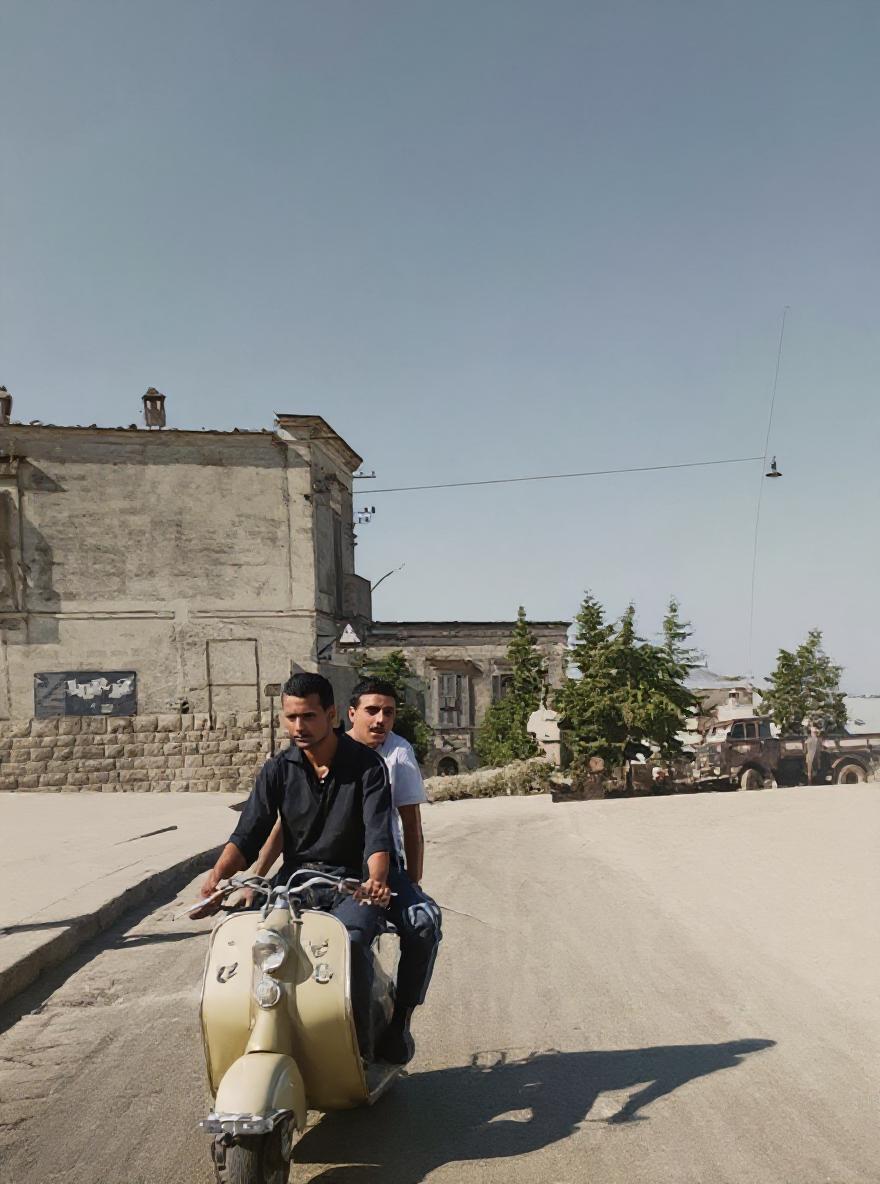
A sepia street scene, cleaned and kept
Scratches, dust spots and creases across the sky removed, colour added from the scene's own tonal information — and the two men on the scooter are the two men on the scooter, not a model's idea of them.
Why the honest answer here is a clear no
It is not built to preserve anything. The documentation states that image prompts and references guide new creations rather than copying them, which is the vendor answering this question in advance.
References are inspiration, and the same documentation warns that intricate details — freckles, lettering, logos on clothing — may not match the reference. On a family portrait, those details are the person.
The Editor inpaints by drawing: a selected area comes back as generated content. A tear becomes a plausible fold and a missing corner becomes plausible background, neither of which is what the print around the damage was telling you.
Every pass re-renders the whole image. Between versions, and between upscales, the pixels move, so a restoration cannot be reproduced, audited or compared against a later one.
The house aesthetic is a strong prior. It is a beautiful aesthetic, and pointed at a 1962 kitchen it produces a 1962 kitchen seen through a contemporary eye — a memory of the photograph rather than the photograph.
Cost accumulates the wrong way for an archive: a subscription plus processing per generation, with reference-heavy generations charged as more work than plain ones. Two hundred prints means two hundred generations and two hundred new pictures.
There is no scanner, no batch correction and no notion of a file to protect. Everything is a creation, which means nothing is a record.
The right job for a generator, and the wrong one
Use it for the photograph that no longer exists
One blurred copy, a description of the dress and the day, and no other source: that is a case for a generator, and Midjourney will make something moving and specific. Give it the details your family actually remembers — the colour of the door, the make of the car, the way he stood — and treat the result as a portrait of a story.
Label the re-creation as a re-creation
Write it on the back of the print and in the file metadata, with the date, and say it out loud to whoever inherits it. A composed picture is a valuable thing; a composed picture that has quietly become evidence is a problem for the next generation, and that is the only irreversible mistake in this whole area.
Repair the photographs you still have, in place
For every print still in the box, the opposite approach applies: the scan is the source of truth, damage is rebuilt from its own surrounding structure, faces are constrained to the original rather than regenerated, and resolution is built to the print size you intend. That is what Pinin does, and the first restoration is free to test.
Private by design
Auto-deleted in 30 days
50 MB and 8,192 px
The largest photo the uploader accepts
First one is free
No credit card required
Midjourney and old photos — the honest FAQ
Can Midjourney restore old photos?
No. Midjourney generates, and its own documentation says so: image prompts and references guide new creations rather than copying them exactly. There is no repair path in the product — the Edit model and the Editor work by generating content for the image you supply, so what comes back is a new photograph that resembles the old one.
Can I use my old photo as a Midjourney reference?
Yes, and it is what most people do. An image prompt or reference steers the subject, composition and palette of the output, and a higher reference weight makes it follow your image more closely. What it cannot do is preserve your pixels: the documentation warns that fine detail such as freckles or lettering may not match the reference at all.
Will Midjourney keep the person's face?
It will produce a face, and on a clear reference it may produce a close likeness. There is no constraint tying the output to the original, though, so what you get is a resemblance rather than a record — and on a small, blurred reference the resemblance is mostly the model's invention. Compare the eyes at 100% before you decide which one you have.
Can Midjourney fix a torn or water-damaged photograph?
The Editor's inpainting will fill the damaged area with generated content, and it can look beautiful. What it cannot do is rebuild the missing pixels from the structure that surrounds them, which is what makes a repaired photograph trustworthy. If the preview looks plausible, ask what is standing in for the missing sleeve.
Is Midjourney good for old photos at all?
For the photograph that is gone, yes — it is the best available answer, and the only one that can build a portrait from a description. For the photograph you still have, no: repairing it and re-imagining it are different operations, and using the second on the first quietly destroys the record you were trying to keep.
What should I use to restore old photos instead?
A repair pipeline that treats the scan as the source of truth: damage rebuilt from the print's own surrounding pixels, tone and colour recovered from the file, faces constrained to the original, and output sized for the print. Pinin runs that pass, the first restoration is free, and the zoom test at 100% will tell you what kind of result you are looking at.
For the photo you still have
Midjourney is the answer when the print is gone and a picture is all that is left. When the print is in your hands, Pinin repairs the file itself — damage rebuilt from the print's own pixels, faces left as they were. First restoration free, no card required.
Restore your first photo for freeWhere this page sends you next
- Can Grok restore old photos? — the same generation, sold as a revival
- Can Copilot restore old photos? — an assistant that reads well and repaints too
- Can Canva restore old photos? — cleanup and layout, with generative fill on the side
- Can Picsart restore old photos? — a one-tap enhancer and its own kind of invention
- Can Lightroom restore old photos? — manual repair, really done
- Can Photoshop restore old photos? — the same control, in skilled hands
- Free photo restoration — test the difference on a print you still have