Can Meta AI restore old photos? Partly — and only for the feed
Meta AI is a generative assistant that lives inside WhatsApp, Instagram and Messenger. It can absolutely make an old photo look better on a phone screen. Repairing one is a different job, and the difference shows up the moment you zoom in or try to print.
No credit card required. Your photo is deleted from storage within 30 days.
The short answer is that Meta AI can edit a photograph and cannot repair one. Ask it to colourise a black-and-white portrait, lift the background, or fill the corner that was torn off, and it will produce an image that does those things — by generating the picture again from what it understands of the scene, at social resolution.
That is a real capability, and for a family group chat it is often enough. What it is not is restoration. There is no damage layer to repair, no notion of the original emulsion, no constraint that the face keep its structure. The output is a new image that resembles your photo, sitting where your photo used to be.
Two practical consequences decide whether you should use it. First, detail that the source cannot resolve gets invented: printed lettering becomes plausible lettering, a background face becomes a generic face. Second, the file arrives at feed resolution with Meta's "Imagined with AI" labelling attached — which is honest, and also disqualifying for a print, a frame, or an archive.
What repair looks like when nothing is re-drawn
The difference is easiest to see where a feed-sized generated image would cheat: the face stays the same person, the texture stays photographic, and the print holds up at arm's length.
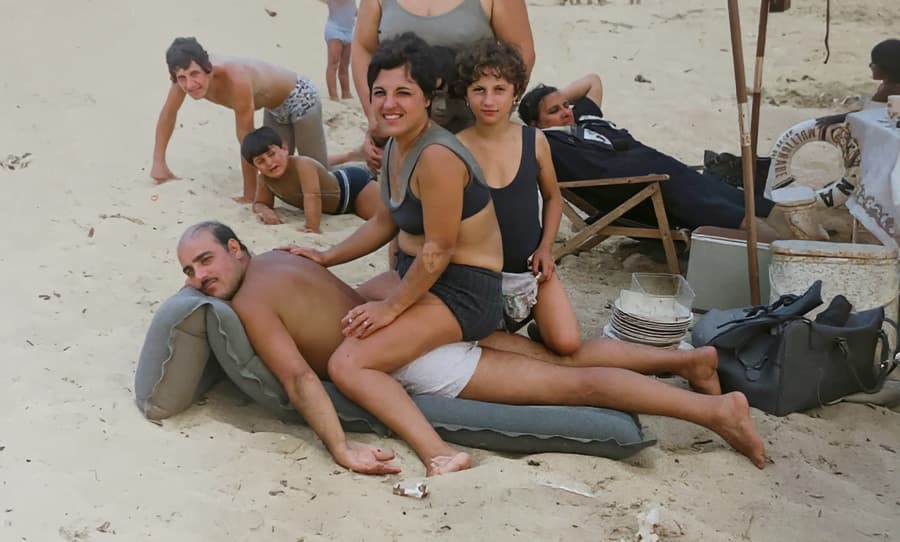
Colour for the feed, not for the archive
Meta AI will colour and clean this in the chat and hand back something that posts well. What you get back is a generated image at feed resolution, not a repaired file.
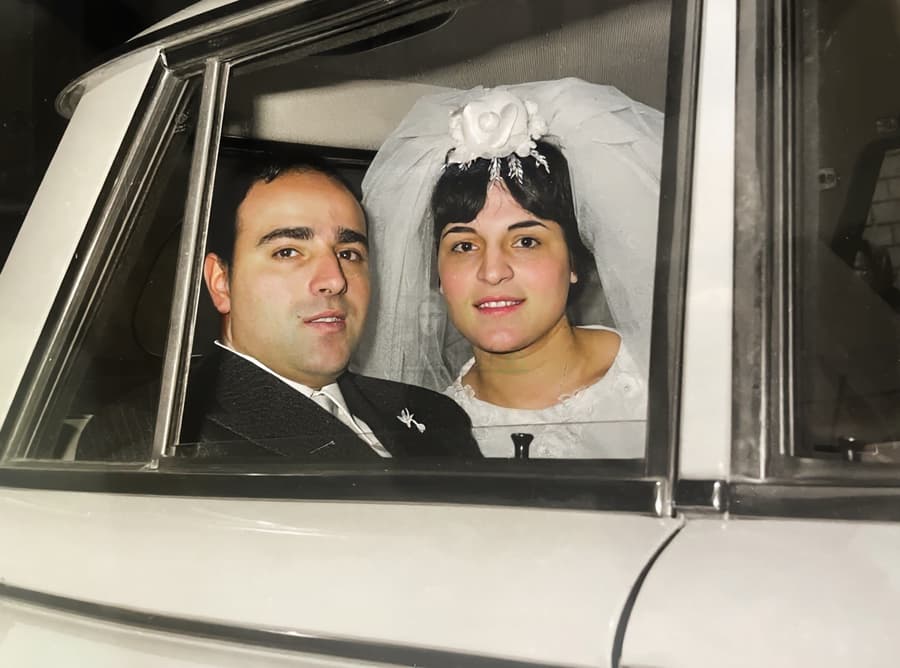
Clean enough to post, not to print
At phone size the result reads as fixed. The test is the print: a generated file at feed resolution has nothing left to put on paper.
The five ways it goes wrong
The whole frame is re-rendered, so anything written in the photo — a studio stamp, a date on the border, a sign in the background — can change into something that was never there.
Faces drift. The output is a plausible version of the person rather than the person, which is the one failure that cannot be fixed later.
Output is sized for a chat bubble, not for a print. Enlarging it afterwards adds a second layer of invention on top of the first.
There is no restoration mode, no damage selection, and no resolution control — the assistant interprets a sentence and returns a picture.
Your photo is uploaded into a social platform's assistant. For a picture of a deceased relative that is a privacy decision some families would rather not make by accident.
How to use Meta AI without losing the photograph
Use it for the version you will send, and nothing else
A colourised portrait that makes the family group chat go quiet is a good outcome, and one prompt delivers it. Ask for one change at a time — "colourize this photograph with natural skin tones and do not change the face" — and keep the original scan untouched on your own disk before you upload anything.
Check the likeness before you believe the result
Open the original and the generated image side by side at 100%. Compare the eyes, the ears, the hairline, the shape of the jaw. If they differ, what you have is an illustration of your photo. It may still be lovely; it is not evidence of what your grandmother looked like, and in a family archive that distinction matters more than the sharpness.
Restore the real file for anything that leaves the phone
Prints, frames, memorial cards, the scan you hand to a genealogist — all of those need the original file repaired: damage inpainted from the surrounding print, faces constrained, resolution rebuilt to 300 dpi at the size you intend to print. Meta AI is a fine place to decide; it is the wrong place to finish.
Private by design
Auto-deleted in 30 days
50 MB and 8,192 px
The largest photo the uploader accepts
First one is free
No credit card required
Meta AI and old photos — the honest FAQ
Can Meta AI restore old photos?
It can produce an edited image that looks restored — cleaner, coloured, more complete — by regenerating the picture. It has no restoration mode: nothing detects the damage layer, nothing constrains the repair to the damaged area, and no face is protected from being redrawn. For a social post that is fine. For the photo itself, it replaces rather than repairs.
Is Meta AI free to use for photo edits?
Meta AI is free inside WhatsApp, Instagram and Messenger, with limits that change as Meta rolls features out. The cost is not money: it is resolution, likeness, and the provenance label attached to the output.
Does Meta AI change the person's face?
Yes, usually. Everything in the frame is generated, and a face is where generation is least faithful — the model knows "an elderly man in a suit" far better than it knows this man. Restoration tools work the other way round: they repair the regions that are damaged and explicitly leave facial structure alone.
Can I print a photo edited with Meta AI?
You can, and it will look soft. Output is sized for a screen, so an 8×10 inch print would need several times the pixels you have — upscaling that file means inventing detail on top of invented detail. If the print matters, restore the original scan at print resolution.
Is it safe to upload an old family photo to Meta AI?
That is a judgement only you can make, but make it deliberately. The photo goes into a social platform's processing, under that platform's terms, and the output is a generated image carrying their label. If the photo is the only surviving copy of someone, keep a local scan, upload a copy, and choose a tool whose business is restoration for anything you plan to keep.
What is Meta AI actually good at here?
Speed and conversation. It sits in an app you already have open, it takes a sentence, and it returns something shareable in seconds — colourising, background cleanup, a quick idea of how a photo could look. Use it to explore; use a restoration pipeline to preserve.
Share the preview. Keep the photograph.
Meta AI is good for a fast look. When the photo has to survive, restore the original file at print resolution — first one free, no card.
Restore your first photo for freeWhere this page sends you next
- Can ChatGPT restore old photos? — the same no, with the reasons spelled out
- Can Claude restore old photos? — no image output at all — and the part it is good at
- Can Gemini restore old photos? — the re-draw outside the feed, at print resolution
- Can Photoshop restore old photos? — the version of this you control pixel by pixel
- Can Remini restore old photos? — the other one-tap app, and what it does to faces
- AI photo restoration — what a repair pipeline does differently