Color cast and fade correction — before and after
Yellow casts and washed-out color, corrected. Real faded photos from real users, rebalanced by Pinin to look like the day they were printed.
Yes — a yellowed or faded photo can be corrected. Pinin models how color print dyes age and reverses the drift channel by channel, so whites land on white and skin returns to skin. Try it on your own photo: your first photo is free and takes about 30 seconds — no editing skills needed.
Before and after examples
Heavy color cast, neutralized
Decades of yellowing lifted in one pass — whites are white again, and every other tone follows.
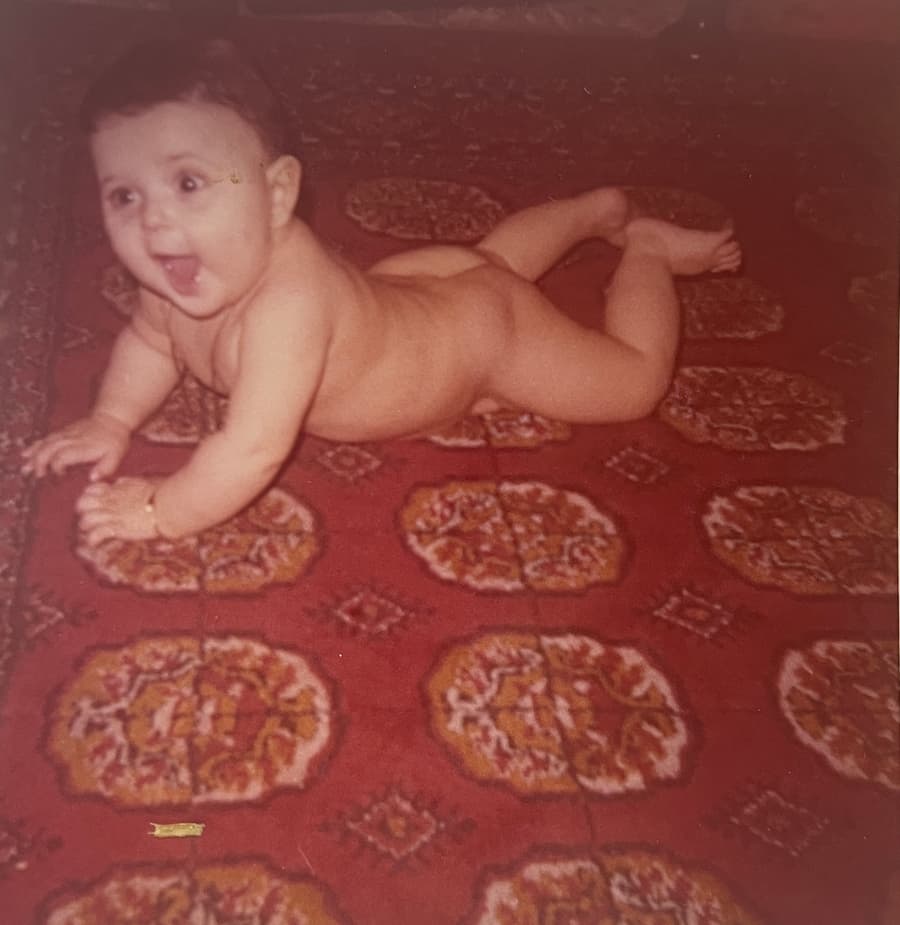
Washed-out print, contrast recovered
Faded color and flat contrast rebuilt — the cyan drift common to old prints is undone.
.png)
Why old photos turn yellow — and how it is reversed
Color prints fade unevenly: the cyan dye layer degrades fastest, which is why aged prints drift toward yellow and red. Scans inherit the drift, and so does every copy made from them. Simple auto-white-balance tools fight the cast globally and often neutralize the whole image into gray.
Pinin estimates the dye degradation curve per channel instead, which recovers the original separation between colors rather than flattening it. Skin returns to skin, sky returns to sky, and whites land on white without the whole photo going cold.
- Per-channel dye degradation model, not a global temperature slider
- Color separation recovered — no gray, washed-out neutralization
- Contrast and density rebuilt alongside the cast correction
- Faded black-and-white prints rebalanced to true neutral
How the examples on this page were made
Each pair is a real user upload corrected with the standard pipeline — one credit covers cast removal, fade recovery, and enhancement together. Drag the slider to compare the faded original with the corrected result.
Frequently asked questions
Can a yellowed photo be restored to original color?
Close to it. The AI models how color print dyes age and reverses the drift per channel. Results read as the original colors; where fading destroyed information entirely, the reconstruction is plausible rather than exact.
Why not just use auto-white-balance?
Auto-white-balance applies one global correction and often flattens legitimate color variation into gray. Pinin corrects the specific per-channel dye degradation of aged prints, preserving color separation — the difference is most visible in skin tones.
Does fade correction work on black-and-white photos too?
Yes. Aged B&W prints yellow toward sepia; the engine rebalances them to true neutral and restores density, which is also the ideal preparation before colorization.
Is white balance correction included in restoration?
Yes — it is part of the standard pipeline. One credit covers damage repair, cast and fade correction, and enhancement in a single pass, and your first photo is free.
My photo is faded AND scratched. Which fixes first?
Scratches, always. Repairing damage before correcting tone prevents the cast from being baked into the inpainted regions. The pipeline runs in that order automatically.
Fix your faded photo — free
Upload your photo and see this transformation on your own image in seconds. First photo free — no credit card required.
More before & after galleries
.png)
Photo restoration
Torn, creased, and water-damaged prints brought back to one clean image.
View gallery.png)
Colorization
Black-and-white portraits brought to life with natural, plausible color.
View gallery.png)
Blur removal
Soft, shaky, and out-of-focus shots sharpened back to crisp detail.
View gallery.png)
Image upscaling
Small, low-resolution images enlarged with natural reconstructed detail.
View gallery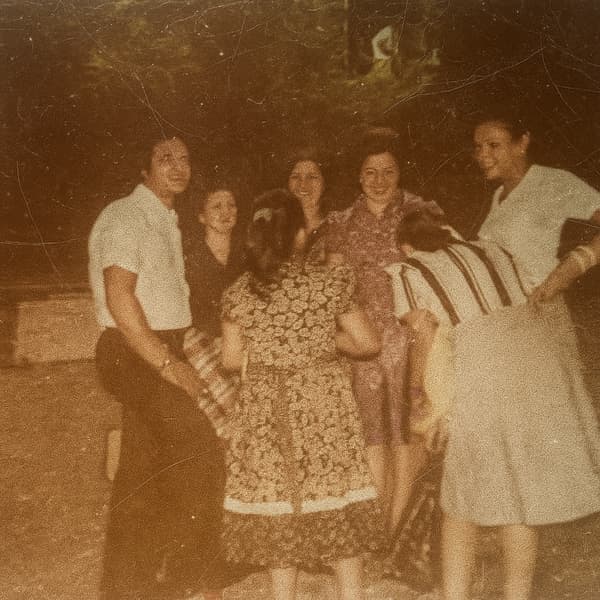
Scratch removal
Scratches, speckles, and cracks erased while the photo underneath stays sharp.
View galleryKeep restoring with Pinin
One credit per photo. Your first restoration is free.